Loading EagLe…

Loading…

✅ CBSE CT+AI 2026-27 Aligned  ·  Available Now

Drag. Connect. Run.
Build real AI.

Grades 1–4  |  No coding. No internet. No limits.

Computer Vision, Sound AI, and Body AI — the same three domains CBSE mandates in its AI curriculum — built for kids who've never written a line of code.

3
AI Domains
30
Day free trial
4 min
First model trained
100%
Works offline
🆂 Aligned with CBSE CT+AI Curriculum 2026-27  ·  Classes 3–8

Built for what CBSE now mandates

The CBSE CT+AI 2026-27 framework introduces AI formally from Class 6. EagLe Junior gives students hands-on AI experience from Grade 3 — so they're ready well before the curriculum demands it.

Classes 3–5 · Preparatory Stage

Computational Thinking Foundations

CBSE: Algorithmic thinking — step-by-step problem solving
EagLe: Drag-and-drop pipeline is literally an algorithm kids build themselves
CBSE: Pattern recognition and decomposition
EagLe: Kids collect examples, spot patterns, and the AI generalises them
Class 7 · Middle Stage AI

AI Domains: Vision, Sound & Classification

CBSE: Computer Vision — how machines understand visual information
EagLe: Image AI + Body AI — train real vision models with a webcam
CBSE: Introduction to classification and data types (images, sound)
EagLe: Sound AI + Smart Brain classification block built in
Class 8 · AI Project Lifecycle

No-Code AI Tools & Project Cycle

CBSE: Define Problem → Collect Data → Test AI Tools → Reflect & Improve
EagLe: This IS the drag-and-drop pipeline — block by block
CBSE: Hands-on experience with no-code AI tools including image classifiers
EagLe: That tool. Exactly.
CBSE Class 8 AI Syllabus says: “Hands-on experience with simple no-code AI tools (image classifiers, chatbots, data prediction apps).” — EagLe Junior is precisely that tool, and starting in Grade 3 means your child is thinking like an AI builder long before Class 8 demands it.

Everything to build real AI

Every capability teaches a real AI concept — without a single line of code.

📷

Image Classification

Take photos or upload images for each class. Train a model that recognises objects, animals, or anything you like.

🥷

Body Pose Detection

Use the webcam to capture body poses. Train the AI to distinguish between sitting, standing, jumping, or custom poses.

🎤

Sound Classification

Record sounds using the microphone — claps, words, instruments. Train a model that listens and classifies in real time.

📖

Famous AI Datasets

Explore MNIST digits, Fashion-MNIST, CIFAR-10 — the same datasets real AI researchers use. See what the AI sees, pixel by pixel.

👔

Hand Pose Detection

Detect hand positions and gestures using your webcam. Build simple sign language or gesture controllers.

🔧

Drag-and-Drop Pipeline

Connect blocks visually — Collect → Train → Test → Deploy. The whole AI project lifecycle visible and editable at a glance.

The same domains professionals use

Computer Vision, Sound AI, and Body AI are the three pillars of modern AI. EagLe Junior brings all three to your classroom — no expertise required.

📷
Computer Vision
"Train AI to see what you see"
Students collect photos with a webcam or upload images. The AI learns to identify objects, animals, body poses, hand gestures — anything visual. Just like Google Lens or face recognition, but trained by the child.
CBSE Class 7 — Computer Vision domain
🎤
Sound AI
"Train AI to hear what you say"
Record claps, words, instrument sounds or background noise. Train a model that listens and classifies in real time using the microphone. Just like voice assistants — but the student builds the brain.
CBSE Class 6 — Sound as data type
🥷
Body AI
"Train AI to read how you move"
The webcam captures 33 body landmarks per frame. Students collect poses — standing, sitting, jumping — and train a model that recognises body positions in real time. No wearables needed.
CBSE Class 7 — AI sensor & movement domain

What you get with EagLe Junior

Everything you need. Nothing you don't.

Works 100% offline — no internet needed in class, ever. No firewall issues, no data going to any server.
CBSE CT+AI 2026-27 aligned — covers what Classes 3–8 need: algorithmic thinking, Computer Vision, AI project lifecycle.
Drag-and-drop — no coding, ever — not "easy coding." Zero code. Blocks connect like puzzle pieces.
Train real AI models — not simulations, not videos. Actual machine learning models running on the student's laptop.
3 real AI domains built in — Computer Vision, Sound AI, Body AI — the exact domains CBSE Class 7 introduces.
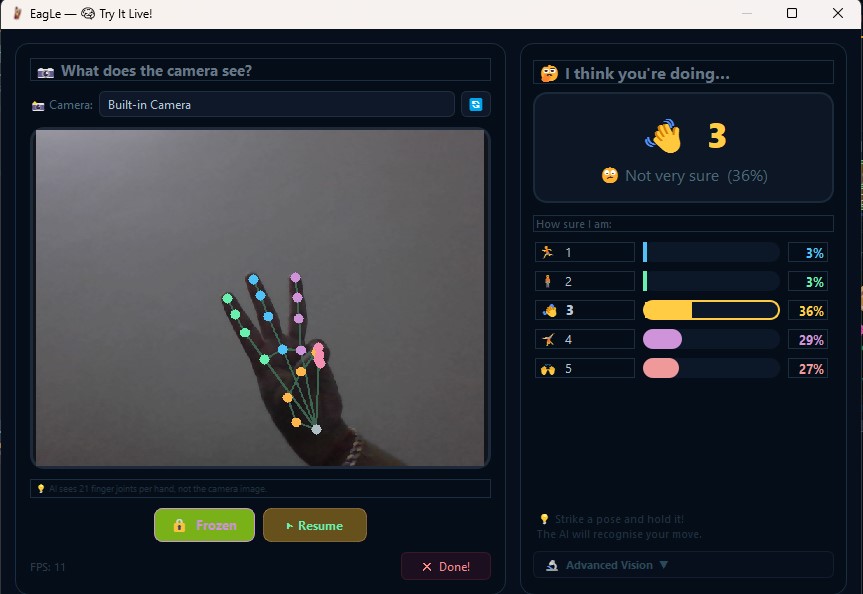
Advanced Computer Vision — tracks 21 hand joint landmarks and 33 body pose points live using your webcam. Real MediaPipe technology, simplified for kids.
Famous research datasets — MNIST, CIFAR-10, Fashion-MNIST. The same data real researchers trained AI on.
Data visualization built in — see every sample in your dataset before training. Explore MNIST digits as pixel grids and understand what your AI is actually learning.
Try It Live after training — test your trained model instantly with the webcam. See it work in real time.
Works on any Windows school PC — no GPU, no cloud account, no admin rights needed. Installs per-user.
Guided step by step — the AI Tutor mascot walks students through every block. Teachers don't need to know AI.
₹499/year for families — less than a single month of most ed-tech platforms. One key, all your devices.

Real AI. Real Results. Zero Code.

Everything you see below was built by a student — drag, connect, run.

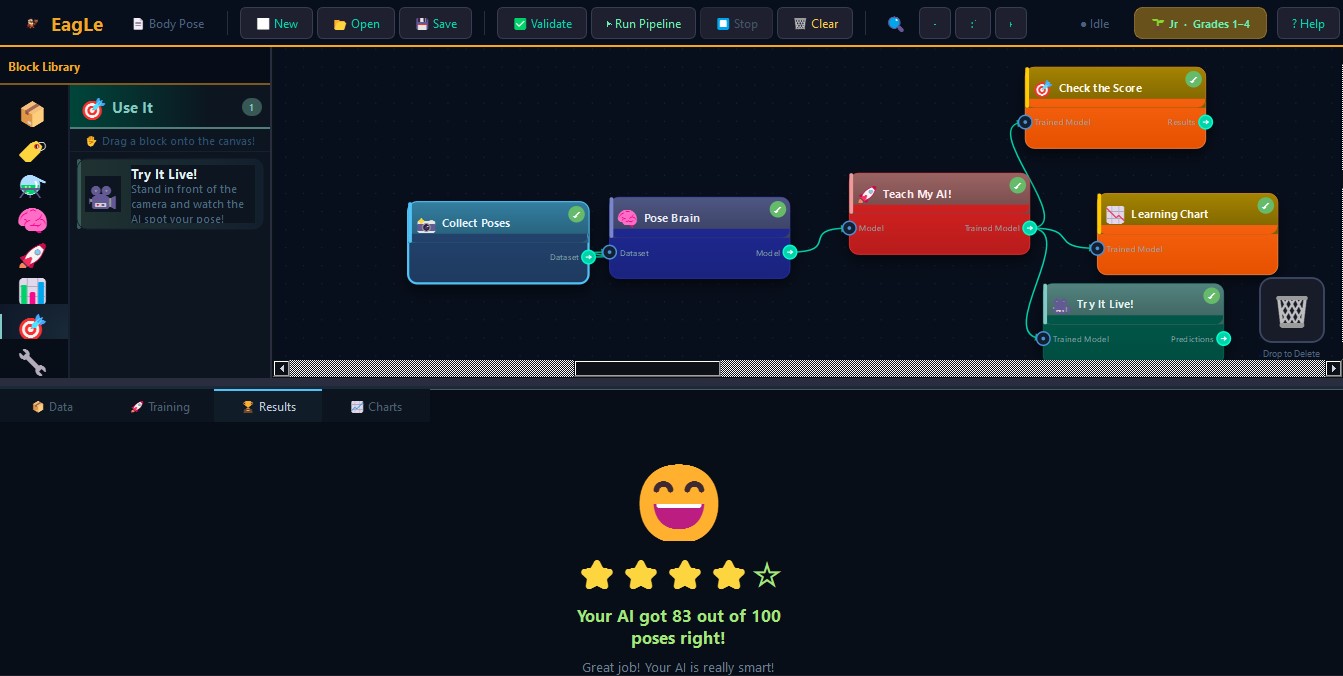
EagLe Junior — Full AI pipeline showing Collect Poses, Pose Brain, Teach My AI and results with 83% accuracy

A complete Body Pose AI — trained and tested in one session. 83 out of 100 poses correct.

EagLe Junior — Live hand detection showing 21 finger joint landmarks in real time

Live AI — sees and tracks 21 hand joints in real time.

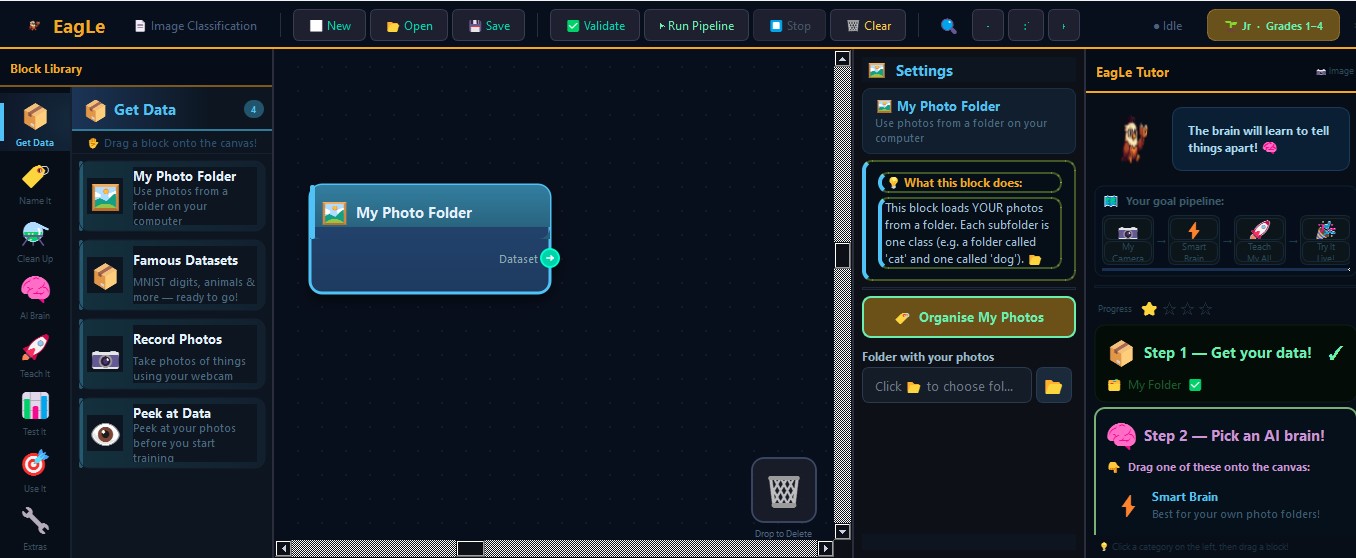
EagLe Junior — Image classification project with block library and AI Tutor guidance panel

Drag blocks, get step-by-step AI Tutor guidance as you build.

EagLe Junior — Famous AI datasets view showing MNIST digit samples with class breakdown

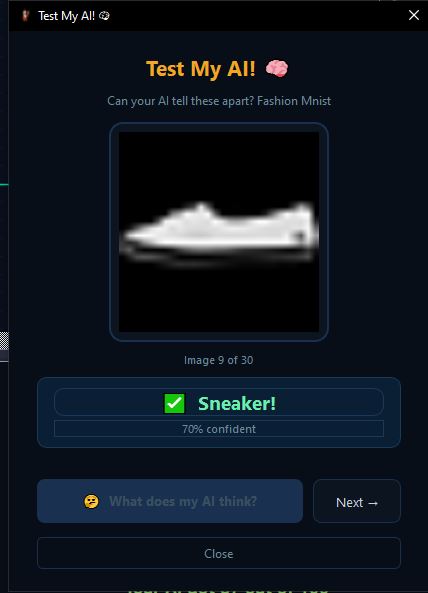
Explore real AI datasets — see what MNIST digits look like pixel by pixel, then train on them.

Students building AI, right now

4,000+
Students who have used EagLe
15+
Schools in pilot program
3
Real AI domains
🇮🇳
Made in India
My Class 7 students trained an image classifier in their very first session — under 30 minutes, zero help from me. They were stunned that they had actually built something. EagLe is exactly the hands-on tool the new CBSE AI curriculum needs in every computer lab.
👩‍🏫
Ridham Mittal
STEM Teacher, CBSE School — Rajasthan
We ran EagLe during our Activity Week for Grades 5 and 6. Students trained body pose models and sound classifiers and kept asking when the next session was. Even students who struggle with computers could participate fully — the drag-and-drop design made sure of that.
👩‍🏫
Pooja Kapoor
Activity Coordinator, CBSE School — Delhi NCR

How a Junior session works

The same steps CBSE Class 8 calls the AI Project Lifecycle.

📷

Collect Examples

Students collect 20–30 examples per class using webcam, mic, or by uploading files. The AI Tutor guides every step — no teacher expertise needed.

Train the Model

Press Train. The model trains right on the laptop — no internet, no waiting. Done in minutes. Famous datasets like MNIST train in about 4 minutes.

🎯

Test & Improve

Switch to Test mode and the AI responds in real time. Students immediately see if it works — and why it might not. Then they collect more examples and retrain.

Simple, transparent pricing

Start free for 30 days. No card needed. Upgrade anytime — one key works on all your devices.

🆕

Start with a 30-Day Free Trial

No payment. No credit card. Full access to all AI domains and features.
Just create an account and download — done in 2 minutes.

Create Free Account →
1 Month
99
family license · all your devices
  • All 3 AI domains (Vision, Sound, Body)
  • Famous AI datasets (MNIST & more)
  • Full offline use
  • Unlimited devices
  • Email support
3 Years
999
₹27/month · lock in for all of middle school
  • All 3 AI domains (Vision, Sound, Body)
  • Famous AI datasets (MNIST & more)
  • Full offline use
  • Unlimited devices
  • Priority support
  • Free app updates for 3 years
  • Best value — covers Classes 6, 7 & 8

🏫 Setting up for a whole class or school?  School packs from ₹150/student/year.  Get school pricing →

After purchase, email your payment screenshot to goyalkushagra92@gmail.com with your email address. License key sent within 24 hours.

Questions we hear every day

Which grades is EagLe Junior designed for?
EagLe Junior is designed for Grades 1–4 (Ages 6–10). The guided AI Tutor and drag-and-drop interface make it accessible from Grade 3 upward with minimal teacher support. It aligns with the CBSE CT+AI 2026-27 curriculum for Classes 3–8 — the earlier a student starts, the more confident they are by Class 6 when AI is formally introduced in school.
Does it need internet to work?
After the initial download and install, EagLe Junior runs 100% offline. No internet needed to collect data, train models, or test them live. This makes it ideal for schools with unreliable or restricted internet, and it means your child's data never leaves your computer.
What AI does my child actually build?
Real machine learning classification models — the same technology used in face recognition, voice assistants, and medical imaging. Students collect their own data (photos, sounds, or body poses), drag blocks to set up the training pipeline, and press Run. The result is a model that runs on their laptop and makes predictions in real time. They can also train on famous research datasets like MNIST (handwritten digits) and CIFAR-10 (animals and vehicles).
Is this aligned with school curriculum?
Yes. EagLe Junior is aligned with the CBSE Computational Thinking and Artificial Intelligence (CT+AI) Curriculum 2026-27 for Classes 3–8. Specifically: the drag-and-drop pipeline covers CT algorithmic thinking (Classes 3–5), the 3 AI domains (Computer Vision, Sound AI, Body AI) map to CBSE Class 7's AI Domains unit, and the overall project structure mirrors the AI Project Lifecycle mandated in CBSE Class 8.
What are the minimum PC requirements?
Windows 10 or 11, 4 GB RAM (8 GB recommended), and about 2 GB of free disk space. A webcam and microphone are needed for Image, Pose, and Sound projects — most laptops have these built in. No GPU, no cloud account, no special hardware needed. It runs on a typical school laptop.
How is this different from just watching YouTube videos about AI?
EagLe is hands-on, not passive. Students don't watch AI — they build it. They collect their own data, make decisions about what to train, see it fail, fix it, and improve it. This builds genuine understanding and confidence. CBSE's own curriculum distinguishes between "AI literacy" (knowing about AI) and "AI capability" (building with AI) — EagLe develops the latter.
Do I need to know anything about AI to help my child?
Not at all. The AI Tutor (built into the app) guides students through every step with age-appropriate explanations. Parents and teachers don't need any AI background. If your child can drag a puzzle piece, they can build an AI model in EagLe.
What happens after the 30-day free trial ends?
After 30 days, the app will prompt you to enter a license key to continue. Your projects and data are saved and safe — nothing is deleted. You can choose Monthly (₹99), Annual (₹499), or 3-Year (₹999) plans. Purchase via UPI, and your license key is emailed within 24 hours.
Can my school or tuition center buy this for all students?
Yes. We offer school packs starting at ₹150/student/year (minimum 20 students). This includes a teacher guide, bulk license keys, and setup support. Use the school inquiry form below or email us directly at goyalkushagra92@gmail.com.
Is my child's data safe? What does EagLe collect?
EagLe Junior works offline — the photos, sounds, and pose data your child collects stay on their own computer and are never uploaded anywhere. The only data we collect during registration is your name and email address (for license management). We do not sell, share, or use any student data for any purpose.

Set up AI for your entire class

School packs from ₹150/student/year. Includes teacher guide, bulk license keys, and setup support.
Fill in the form below — we'll reply within 24 hours with a custom quote.

Your students' first AI model
is one click away.

30-day free trial. Windows installer. No technical setup. CBSE CT+AI aligned.